Thursday, February 21, 2013
Beta
Crimmor is ready for beta. I've messaged people that tested the proof of concept long ago, and a few builders. Since dropbox doesn't have unlimited bandwidth on accounts I don't want to post links for everyone and get the dropbox account temporarily locked, preventing people from downloading, if you are interested send me a message via Bioware Social, my profile is here: http://social.bioware.com/2429179/ .

Monday, February 11, 2013
Bringing .max files into Gmax, without Max
You need 3DExplorer from http://dutch-boy.com/3De/ (version 1.8 or above), which will open .max files and allow you to save them as .3ds and .obj. Once they are in .3ds you need gmax scripts that can import the object into gmax. Fortunately someone made scripts for that. You need the 3ds importer v1.1 from http://pages.videotron.com/browser/ I found that page via the Natural Selection modding website, at http://forums.unknownworlds.com/discussion/95819
Tuesday, February 5, 2013
Summoning the Sound Ninja - a PlaySound fix
The PlaySound function puts a sound playing request into the queue of the target creature, which means it doesn't actually play the sound until the other actions in the queue happen. "But I want to play the sound now, not when and even if the queue finishes" you say?
http://nwn2.wikia.com/wiki/PlaySound mentioned using a scripthidden "sound ninja" to stand in and play a sound, but didn't have an implementation, and the suggested implementation looked like it hard coded the sound into the onSpawn script of the sound ninja, so you'd have to make a different ninja with a different script for each sound. So here you go, a generic sound ninja summoning version of PlaySound, this ninja does not require any scripts at all.
/*
credit to kevL at http://social.bioware.com/forum/1/topic/164/index/15800566#15801095
ga_play_sound replacement, summons the "sound ninja" creature to play sounds since
playsound goes at end of action queue, so an npc may not play immediately
for more see http://nwn2.wikia.com/wiki/PlaySound
Note that the sound ninja does not need to have any scripts on it at all, but "Disable AI
while hidden" must not be checked.
Also note the string sSound is not the tag of a sound object, but the name of the actual
wav sound file to play
*/
#include "ginc_param_const"
void kL_PlayNinja(string sSound, object oSoundNinja, float fDelay)
{
DelayCommand(fDelay, AssignCommand(oSoundNinja, PlaySound(sSound)));
fDelay += 10.f;
DelayCommand(fDelay, DestroyObject(oSoundNinja));
}
void main(string sSound, string sTarget, float fDelay)
{
object oTarget = GetTarget(sTarget, TARGET_OWNER);//
location lTarget = GetLocation(oTarget);
object oSoundNinja = CreateObject(OBJECT_TYPE_CREATURE, "sh_sound_ninja", lTarget);
if (GetIsObjectValid(oSoundNinja))
{
DelayCommand(0.1f, kL_PlayNinja(sSound, oSoundNinja, fDelay));
}
}
http://nwn2.wikia.com/wiki/PlaySound mentioned using a scripthidden "sound ninja" to stand in and play a sound, but didn't have an implementation, and the suggested implementation looked like it hard coded the sound into the onSpawn script of the sound ninja, so you'd have to make a different ninja with a different script for each sound. So here you go, a generic sound ninja summoning version of PlaySound, this ninja does not require any scripts at all.
/*
credit to kevL at http://social.bioware.com/forum/1/topic/164/index/15800566#15801095
ga_play_sound replacement, summons the "sound ninja" creature to play sounds since
playsound goes at end of action queue, so an npc may not play immediately
for more see http://nwn2.wikia.com/wiki/PlaySound
Note that the sound ninja does not need to have any scripts on it at all, but "Disable AI
while hidden" must not be checked.
Also note the string sSound is not the tag of a sound object, but the name of the actual
wav sound file to play
*/
#include "ginc_param_const"
void kL_PlayNinja(string sSound, object oSoundNinja, float fDelay)
{
DelayCommand(fDelay, AssignCommand(oSoundNinja, PlaySound(sSound)));
fDelay += 10.f;
DelayCommand(fDelay, DestroyObject(oSoundNinja));
}
void main(string sSound, string sTarget, float fDelay)
{
object oTarget = GetTarget(sTarget, TARGET_OWNER);//
location lTarget = GetLocation(oTarget);
object oSoundNinja = CreateObject(OBJECT_TYPE_CREATURE, "sh_sound_ninja", lTarget);
if (GetIsObjectValid(oSoundNinja))
{
DelayCommand(0.1f, kL_PlayNinja(sSound, oSoundNinja, fDelay));
}
}
Friday, February 1, 2013
January Update : Part 2
So now I'm fixing all the things I broke in my bungled conversion to a six module campaign. While I had played Crimmor to completion in December, I'm currently not able to. Not to worry though, I've fixed lots of other bugs that were present when I was able to play all the way through.
 In this image, the pc was tasked with forging some orders for a caravan
company. This was made complicated by the fact the merchant
representative of the company is standing behind the counter, and there
is a locked door behind/next to him where the offices and the order book
is.
In this image, the pc was tasked with forging some orders for a caravan
company. This was made complicated by the fact the merchant
representative of the company is standing behind the counter, and there
is a locked door behind/next to him where the offices and the order book
is.Solutions available:
1.Pickpocket the door key from the merchant, then use that key when the merchant isn't looking in order to get inside the office (PRR ownership scripts mean the merchant "owns" the door and pays attention to attempts to pick it/knock it down).
2. Intimidate or bluff the merchant into giving you the key. Now that you "legitimately" have access to the door, the merchant doesn't pay any attention to you using the door.
3. Use the special Hidden Theurgy ability if available to cast a suitable spell on the merchant, so he will willingly give you the key.
4. Kill him and take the key. How gauche. Plus the merchant will fight back, and stands a decent chance of killing the thief.
The PC is a thief/wizard and has Hidden Theurgy. He knows a relevant spell for use on the merchant, in this case Charm Person, and passed the skill checks (Concentration, Sleight of Hand, and Spellcraft) that allowed him to cast it on the merchant during conversation without the merchant knowing.
Charmed, the merchant thus willingly gave him the key, and the thief is in the offices.
Now the player has to actually forge the orders in the books. He can try his penmanship via skill and stat check, cast a True Strike he has memorized in order to temporarily give himself perfectly matching penmanship, or simply call the merchant he charmed in order to have the merchant change his own orders.
Wednesday, January 30, 2013
January Update: Commoner AI
January has a large update, so I've broken it into two parts so your eyes don't glaze over reading. :-) The first part is about the commoner ai.
I started testing Crimmor with commoners running my commoner ai, and discovered performance with as many commoners as I wanted was terrible. Miserably terrible. Horrific. I was actually causing spontaneous crashes because of high memory usage. For me, this was happening around 1.5 gigs of memory in use. For comparison, Storm of Zehir uses up to around 900 megs on my pc.
I had Crimmor as one big module, something I had wanted so that once the game loads the player can move around the city with minimal loading. So I split Crimmor into 6 modules, each of moderate (15-20 area) size, one module for each ward of the city and one module for the few areas outside the city.
At the end of that, my campaign was still crashing from memory usage, so I had to address the commoner ai directly. I decided to have my commoners adopt specific activities instead of dynamically deciding, and only change twice a day, to go home at night and wake up in the morning. So I wrote up activity specific heartbeat scripts for commoners covering the 20 or so activities I felt would be most common from the commoner ai. (released at http://nwvault.ign.com/View.php?view=NWN2Scripts.Detail&id=404).
These new generic activity heartbeats actually support combat, so they can be used for enemies, and many only require setting a heartbeat, so they are even easier to set up than the full commoner ai. It's a major addition to my existing commoner ai. You can now easily have your orcs eating dinner when the player walks in, and they will get up and attack :-)
Anyway, these new heartbeats brought Crimmor's memory usage back down to a reasonable level, typically 1 to 1.2 gig, and my crashes have ended. It's still higher than other modules because I have a lot of things going on ai wise, lots of city folk. I may still write custom versions of these scripts to include the Brian Meyer's CSL if that's necessary to make the city as crowded as I want, as his CSL ai can handle hundreds on npcs in combat simultaneously.
I started testing Crimmor with commoners running my commoner ai, and discovered performance with as many commoners as I wanted was terrible. Miserably terrible. Horrific. I was actually causing spontaneous crashes because of high memory usage. For me, this was happening around 1.5 gigs of memory in use. For comparison, Storm of Zehir uses up to around 900 megs on my pc.
I had Crimmor as one big module, something I had wanted so that once the game loads the player can move around the city with minimal loading. So I split Crimmor into 6 modules, each of moderate (15-20 area) size, one module for each ward of the city and one module for the few areas outside the city.
At the end of that, my campaign was still crashing from memory usage, so I had to address the commoner ai directly. I decided to have my commoners adopt specific activities instead of dynamically deciding, and only change twice a day, to go home at night and wake up in the morning. So I wrote up activity specific heartbeat scripts for commoners covering the 20 or so activities I felt would be most common from the commoner ai. (released at http://nwvault.ign.com/View.php?view=NWN2Scripts.Detail&id=404).
These new generic activity heartbeats actually support combat, so they can be used for enemies, and many only require setting a heartbeat, so they are even easier to set up than the full commoner ai. It's a major addition to my existing commoner ai. You can now easily have your orcs eating dinner when the player walks in, and they will get up and attack :-)
Anyway, these new heartbeats brought Crimmor's memory usage back down to a reasonable level, typically 1 to 1.2 gig, and my crashes have ended. It's still higher than other modules because I have a lot of things going on ai wise, lots of city folk. I may still write custom versions of these scripts to include the Brian Meyer's CSL if that's necessary to make the city as crowded as I want, as his CSL ai can handle hundreds on npcs in combat simultaneously.
Sunday, December 30, 2012
December Update
 At the beginning of the year I'd hoped to be able to release in December, but the new main plot I added, and the loss and having to go back to very old versions of a few key areas, have left me behind schedule by a month of two I think (I'm bad at estimating these things).
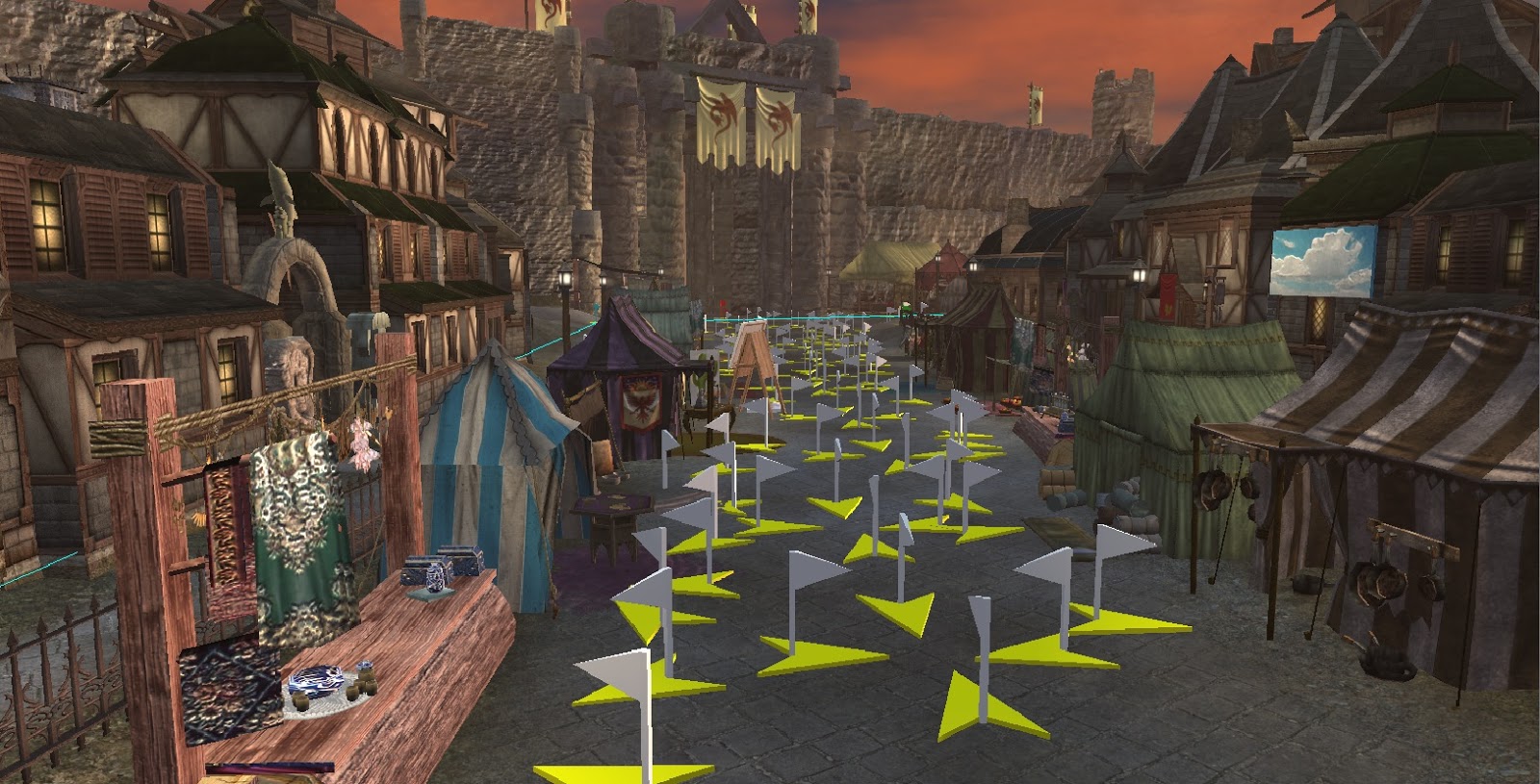 December has been almost all testing. I've gone from testing in my test module to testing in the actual game. My test module is set up to test various systems like usable lights, the main quest, and long sidequest chains (the short sidequests like fetch quests are generally quick to test in the real module). In November I finished a run through of the main quest in the test module and moved on to testing in the real module.
This month I was able to run through the main quest in the actual module, get a long since broken sidequest chain fixed, and make my first pass through things being nitpicky and seeing where I want to adjust things like adding usable lights in more areas for "feel".
In the real module I make check things like camera angles, walkmesh, making sure usable items are actually usable in addition to continuing to test quests. There's always tons of little adjustments I make to the game world when I'm at this stage, adjusting conversation wording, making small adjustments to the look of areas.
I'm still working on getting sound levels right (all environmental sound is custom). Putting in commoners and merchants using my commoner ai will be the last thing.
First two screenshots are ingame via the freecam from the debug console. Performance is fine on my pc, I'll be asking for feedback on performance from testers.
The third probably makes builders cringe as to what required that mess of waypoints. Those are actually for my commoner ai, and are placed via prefab groupings of waypoints. They're not there because individual scripts need them, the commoner ai deals with them automatically.
Saturday, November 17, 2012
Fixing another SLS bug: for usable placeables initially in on state.
In the SLS link there is a bug with usable placeables such as campfires that are designed to be turned on and off, when they are on to start with (startstate = on) in the variables of the placeable.
If they are on to start with, the first time you use an on placeable, it remains on. Subsequent times the placeable turns off/on correctly, but any vfx remains whether they are on or off (it actually gets recreated, effectively remaining "on").
In the function SLS2Initialize in ginc_sls2, the last section of the function looks like the following.
} else {
if (sStartState=="off") {
SLS2SetLightState(oFitting,SLS2_LIGHTSTATE_PERMAOFF);
SetLocalInt(oFitting,"sls2_state",SLS2_LIGHTSTATE_PERMAOFF);
} else {
SetLocalInt(oFitting,"sls2_state",SLS2_LIGHTSTATE_PERMAON);
}
}
SetLocalInt(oFitting,"sls2_init",1);
// set light to relavant starting state
SLS2SetLightState(oFitting,SLS2CalcLightState(oFitting));
}
}
---------------------------------------------------------------------------------------
the line: SetLocalInt(oFitting,"sls2_state",SLS2_LIGHTSTATE_PERMAON);
should be SetLocalInt(oFitting,"sls2_state",SLS2_LIGHTSTATE_ON);
and the placeable will behave correctly, with initial use of the placeable correctly turning it off, and any associated vfx correctly appearing/disappearing based on state.
This is in addition to the nwn2 light tag bug (saving and reloading the game causes lights to lose their tags, breaking SLS.), which can be resolved for SLS via the following: (link)
in ginc_sls2, line 352 is:
string sLightTag = GetLocalString(oFitting,"lightTag");
comment that out and replace it with
//work around tag bug. kamal
object oLight = GetNearestObject(OBJECT_TYPE_LIGHT, oFitting, 1);
string sLightTag = GetLocalString(oFitting,"lightTag");
SetTag(oLight, sLightTag);
--------------------------------------------------------------------------------------------
One last quirk: the vfxBlueprint variable on placeables that controls the vfx to be used, refers to the resref, not the tag. It wasn't obvious to me (going from my memory). SLS2 vfx do not have the same string for a tag and resref, while stock vfx do.
If they are on to start with, the first time you use an on placeable, it remains on. Subsequent times the placeable turns off/on correctly, but any vfx remains whether they are on or off (it actually gets recreated, effectively remaining "on").
In the function SLS2Initialize in ginc_sls2, the last section of the function looks like the following.
} else {
if (sStartState=="off") {
SLS2SetLightState(oFitting,SLS2_LIGHTSTATE_PERMAOFF);
SetLocalInt(oFitting,"sls2_state",SLS2_LIGHTSTATE_PERMAOFF);
} else {
SetLocalInt(oFitting,"sls2_state",SLS2_LIGHTSTATE_PERMAON);
}
}
SetLocalInt(oFitting,"sls2_init",1);
// set light to relavant starting state
SLS2SetLightState(oFitting,SLS2CalcLightState(oFitting));
}
}
---------------------------------------------------------------------------------------
the line: SetLocalInt(oFitting,"sls2_state",SLS2_LIGHTSTATE_PERMAON);
should be SetLocalInt(oFitting,"sls2_state",SLS2_LIGHTSTATE_ON);
and the placeable will behave correctly, with initial use of the placeable correctly turning it off, and any associated vfx correctly appearing/disappearing based on state.
This is in addition to the nwn2 light tag bug (saving and reloading the game causes lights to lose their tags, breaking SLS.), which can be resolved for SLS via the following: (link)
in ginc_sls2, line 352 is:
string sLightTag = GetLocalString(oFitting,"lightTag");
comment that out and replace it with
//work around tag bug. kamal
object oLight = GetNearestObject(OBJECT_TYPE_LIGHT, oFitting, 1);
string sLightTag = GetLocalString(oFitting,"lightTag");
SetTag(oLight, sLightTag);
--------------------------------------------------------------------------------------------
One last quirk: the vfxBlueprint variable on placeables that controls the vfx to be used, refers to the resref, not the tag. It wasn't obvious to me (going from my memory). SLS2 vfx do not have the same string for a tag and resref, while stock vfx do.
Subscribe to:
Posts (Atom)