January has a large update, so I've broken it into two parts so your eyes don't glaze over reading. :-) The first part is about the commoner ai.
I started testing Crimmor with commoners running my commoner ai, and discovered performance with as many commoners as I wanted was terrible. Miserably terrible. Horrific. I was actually causing spontaneous crashes because of high memory usage. For me, this was happening around 1.5 gigs of memory in use. For comparison, Storm of Zehir uses up to around 900 megs on my pc.
I had Crimmor as one big module, something I had wanted so that once the game loads the player can move around the city with minimal loading. So I split Crimmor into 6 modules, each of moderate (15-20 area) size, one module for each ward of the city and one module for the few areas outside the city.
At the end of that, my campaign was still crashing from memory usage, so I had to address the commoner ai directly. I decided to have my commoners adopt specific activities instead of dynamically deciding, and only change twice a day, to go home at night and wake up in the morning. So I wrote up activity specific heartbeat scripts for commoners covering the 20 or so activities I felt would be most common from the commoner ai. (released at http://nwvault.ign.com/View.php?view=NWN2Scripts.Detail&id=404).
These new generic activity heartbeats actually support combat, so they can be used for enemies, and many only require setting a heartbeat, so they are even easier to set up than the full commoner ai. It's a major addition to my existing commoner ai. You can now easily have your orcs eating dinner when the player walks in, and they will get up and attack :-)
Anyway, these new heartbeats brought Crimmor's memory usage back down to a reasonable level, typically 1 to 1.2 gig, and my crashes have ended. It's still higher than other modules because I have a lot of things going on ai wise, lots of city folk. I may still write custom versions of these scripts to include the Brian Meyer's CSL if that's necessary to make the city as crowded as I want, as his CSL ai can handle hundreds on npcs in combat simultaneously.
Wednesday, January 30, 2013

Sunday, December 30, 2012
December Update
 At the beginning of the year I'd hoped to be able to release in December, but the new main plot I added, and the loss and having to go back to very old versions of a few key areas, have left me behind schedule by a month of two I think (I'm bad at estimating these things).
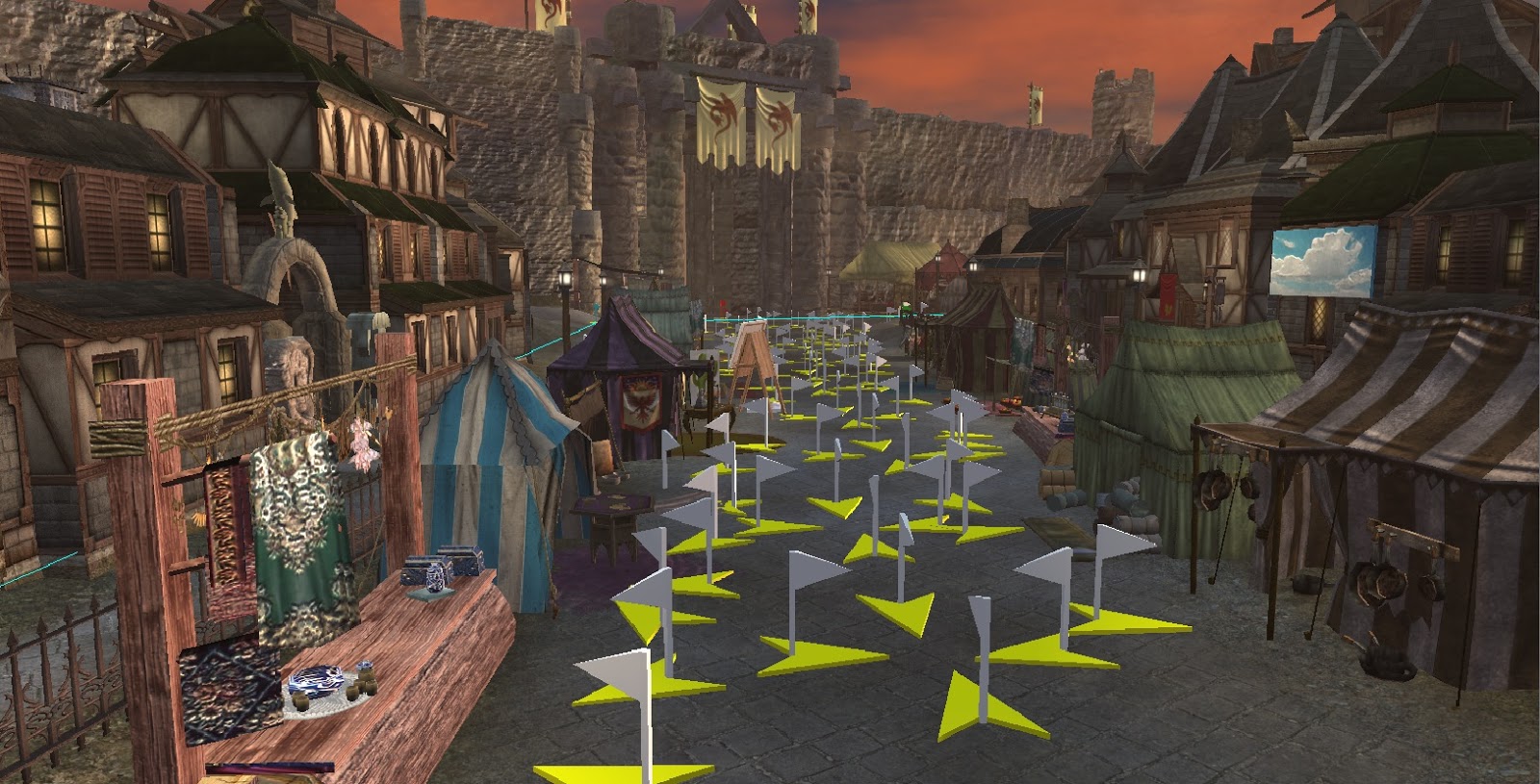 December has been almost all testing. I've gone from testing in my test module to testing in the actual game. My test module is set up to test various systems like usable lights, the main quest, and long sidequest chains (the short sidequests like fetch quests are generally quick to test in the real module). In November I finished a run through of the main quest in the test module and moved on to testing in the real module.
This month I was able to run through the main quest in the actual module, get a long since broken sidequest chain fixed, and make my first pass through things being nitpicky and seeing where I want to adjust things like adding usable lights in more areas for "feel".
In the real module I make check things like camera angles, walkmesh, making sure usable items are actually usable in addition to continuing to test quests. There's always tons of little adjustments I make to the game world when I'm at this stage, adjusting conversation wording, making small adjustments to the look of areas.
I'm still working on getting sound levels right (all environmental sound is custom). Putting in commoners and merchants using my commoner ai will be the last thing.
First two screenshots are ingame via the freecam from the debug console. Performance is fine on my pc, I'll be asking for feedback on performance from testers.
The third probably makes builders cringe as to what required that mess of waypoints. Those are actually for my commoner ai, and are placed via prefab groupings of waypoints. They're not there because individual scripts need them, the commoner ai deals with them automatically.
Saturday, November 17, 2012
Fixing another SLS bug: for usable placeables initially in on state.
In the SLS link there is a bug with usable placeables such as campfires that are designed to be turned on and off, when they are on to start with (startstate = on) in the variables of the placeable.
If they are on to start with, the first time you use an on placeable, it remains on. Subsequent times the placeable turns off/on correctly, but any vfx remains whether they are on or off (it actually gets recreated, effectively remaining "on").
In the function SLS2Initialize in ginc_sls2, the last section of the function looks like the following.
} else {
if (sStartState=="off") {
SLS2SetLightState(oFitting,SLS2_LIGHTSTATE_PERMAOFF);
SetLocalInt(oFitting,"sls2_state",SLS2_LIGHTSTATE_PERMAOFF);
} else {
SetLocalInt(oFitting,"sls2_state",SLS2_LIGHTSTATE_PERMAON);
}
}
SetLocalInt(oFitting,"sls2_init",1);
// set light to relavant starting state
SLS2SetLightState(oFitting,SLS2CalcLightState(oFitting));
}
}
---------------------------------------------------------------------------------------
the line: SetLocalInt(oFitting,"sls2_state",SLS2_LIGHTSTATE_PERMAON);
should be SetLocalInt(oFitting,"sls2_state",SLS2_LIGHTSTATE_ON);
and the placeable will behave correctly, with initial use of the placeable correctly turning it off, and any associated vfx correctly appearing/disappearing based on state.
This is in addition to the nwn2 light tag bug (saving and reloading the game causes lights to lose their tags, breaking SLS.), which can be resolved for SLS via the following: (link)
in ginc_sls2, line 352 is:
string sLightTag = GetLocalString(oFitting,"lightTag");
comment that out and replace it with
//work around tag bug. kamal
object oLight = GetNearestObject(OBJECT_TYPE_LIGHT, oFitting, 1);
string sLightTag = GetLocalString(oFitting,"lightTag");
SetTag(oLight, sLightTag);
--------------------------------------------------------------------------------------------
One last quirk: the vfxBlueprint variable on placeables that controls the vfx to be used, refers to the resref, not the tag. It wasn't obvious to me (going from my memory). SLS2 vfx do not have the same string for a tag and resref, while stock vfx do.
If they are on to start with, the first time you use an on placeable, it remains on. Subsequent times the placeable turns off/on correctly, but any vfx remains whether they are on or off (it actually gets recreated, effectively remaining "on").
In the function SLS2Initialize in ginc_sls2, the last section of the function looks like the following.
} else {
if (sStartState=="off") {
SLS2SetLightState(oFitting,SLS2_LIGHTSTATE_PERMAOFF);
SetLocalInt(oFitting,"sls2_state",SLS2_LIGHTSTATE_PERMAOFF);
} else {
SetLocalInt(oFitting,"sls2_state",SLS2_LIGHTSTATE_PERMAON);
}
}
SetLocalInt(oFitting,"sls2_init",1);
// set light to relavant starting state
SLS2SetLightState(oFitting,SLS2CalcLightState(oFitting));
}
}
---------------------------------------------------------------------------------------
the line: SetLocalInt(oFitting,"sls2_state",SLS2_LIGHTSTATE_PERMAON);
should be SetLocalInt(oFitting,"sls2_state",SLS2_LIGHTSTATE_ON);
and the placeable will behave correctly, with initial use of the placeable correctly turning it off, and any associated vfx correctly appearing/disappearing based on state.
This is in addition to the nwn2 light tag bug (saving and reloading the game causes lights to lose their tags, breaking SLS.), which can be resolved for SLS via the following: (link)
in ginc_sls2, line 352 is:
string sLightTag = GetLocalString(oFitting,"lightTag");
comment that out and replace it with
//work around tag bug. kamal
object oLight = GetNearestObject(OBJECT_TYPE_LIGHT, oFitting, 1);
string sLightTag = GetLocalString(oFitting,"lightTag");
SetTag(oLight, sLightTag);
--------------------------------------------------------------------------------------------
One last quirk: the vfxBlueprint variable on placeables that controls the vfx to be used, refers to the resref, not the tag. It wasn't obvious to me (going from my memory). SLS2 vfx do not have the same string for a tag and resref, while stock vfx do.
Friday, October 19, 2012
Jumping implemented in NWN2.
Nexus link
Vault link
Rewrite of the Markshire Climbing system (http://nwvault.ign.com/View.php?view=nwn2scripts.detail&id=103) into a jumping system. There's not a whole lot of Markshire code left.
Included demo area includes jumping to a waypoint destination, and jumping dynamically around at area based on player facing. Dynamic jumping is blocked by sufficient obstruction, or lack of a line of sight to the destination. Falling damage is calculated how far you fall on the z axis (in other words, it reads from the actual map and determines the distance of the fall. Jumping/falling is handled per d20 srd rules for jumping and falling.
The dynamic jumping would be suitable for implementation as a feat, presumably with some sort of cooldown. You'd probably want to make the player select a destination, and could use some of the DC code from the waypoint jump function to determine the DC.
Technically, the pc doesn't actually jump and inhabit the space of the path. The code for dynamic jumping looks for obstructions in the determined path of the jump, and won't jump if there's too many invalid locations in between, or if the jumper's line of sight is blocked (there are included messages for each).
youtube video showing directional jumping:
http://www.youtube.com/watch?v=NAoknKO2CLU&feature=youtu.be
early video, shows targetted jump and illustrated the bug mentioned above
http://www.youtube.com/watch?v=6aRFou6HCyA&list=UUTB3It7cV5bt9luZ4hFSlCw&index=2&feature=plcp
Vault link
Rewrite of the Markshire Climbing system (http://nwvault.ign.com/View.php?view=nwn2scripts.detail&id=103) into a jumping system. There's not a whole lot of Markshire code left.
Included demo area includes jumping to a waypoint destination, and jumping dynamically around at area based on player facing. Dynamic jumping is blocked by sufficient obstruction, or lack of a line of sight to the destination. Falling damage is calculated how far you fall on the z axis (in other words, it reads from the actual map and determines the distance of the fall. Jumping/falling is handled per d20 srd rules for jumping and falling.
The dynamic jumping would be suitable for implementation as a feat, presumably with some sort of cooldown. You'd probably want to make the player select a destination, and could use some of the DC code from the waypoint jump function to determine the DC.
Technically, the pc doesn't actually jump and inhabit the space of the path. The code for dynamic jumping looks for obstructions in the determined path of the jump, and won't jump if there's too many invalid locations in between, or if the jumper's line of sight is blocked (there are included messages for each).
youtube video showing directional jumping:
http://www.youtube.com/watch?v=NAoknKO2CLU&feature=youtu.be
early video, shows targetted jump and illustrated the bug mentioned above
http://www.youtube.com/watch?v=6aRFou6HCyA&list=UUTB3It7cV5bt9luZ4hFSlCw&index=2&feature=plcp
Sunday, October 14, 2012
Good reason for an update :-)
Update:
As of today, the new main plot is tested through to completion in the test area. That makes a nice milestone towards completion. There's still a bunch of lines of conversation in the new plot that say "placeholder...", but the conditionals and scripts are in and apparently working.
Remaining:
Take care of some placeholder sidequests. They work, but aren't fully developed, or the areas for them are placeholders.
Put in sound in areas that don't currently have it.
Get consistency of activities through the campaign. For instance the use of my generic foraging/scavenging system is currently concentrated in a few areas. There are many other areas where I could realistically add potentially scavengable items.
Eliminate placeholder conversations, and get a consistent 'voice' for the Thieves Cant spoken in the campaign. There's a lot of Cant spoken in Crimmor, but since I'm learning it and writing over a period of time, I need to go over things and edit where needed so it has a consistent 'voice'
Miscellaneous scripting of npc activities to bring the city to life. My commoner ai goes a long way, but some npc's need specific scripting.
More pre-beta testing, testing, testing.
As of today, the new main plot is tested through to completion in the test area. That makes a nice milestone towards completion. There's still a bunch of lines of conversation in the new plot that say "placeholder...", but the conditionals and scripts are in and apparently working.
Remaining:
Take care of some placeholder sidequests. They work, but aren't fully developed, or the areas for them are placeholders.
Put in sound in areas that don't currently have it.
Get consistency of activities through the campaign. For instance the use of my generic foraging/scavenging system is currently concentrated in a few areas. There are many other areas where I could realistically add potentially scavengable items.
Eliminate placeholder conversations, and get a consistent 'voice' for the Thieves Cant spoken in the campaign. There's a lot of Cant spoken in Crimmor, but since I'm learning it and writing over a period of time, I need to go over things and edit where needed so it has a consistent 'voice'
Miscellaneous scripting of npc activities to bring the city to life. My commoner ai goes a long way, but some npc's need specific scripting.
More pre-beta testing, testing, testing.
Sunday, October 7, 2012
Freesound project is released!
Approximately 2450 sounds from freesound.org, re-encoded and renamed by myself so they can be used in nwn2. I have also provided nwn2 sound blueprints for each sound. This is roughly 10x the number of sounds nwn2 includes via the toolset. This pack is complete with blueprints organized into categories based on default nwn2 sound organization. Sounds from freesound.org are licensed under one of four Creative Commons licenses, see the credits for specifics. The filenames had to be shortened for nwn2, so the initial number matches the number of the file on freesound.org (the numbers are unique).
Note that these sounds are generally recorded from real life, and are generally high quality (some of the "zombie groans" are groan worthy :-) )
Sounds have been grouped into 4 groups of approximately equal number of files. You probably want to download all four groups, and select the sounds that work for your module or campaign, removing the rest. The sounds should be copied to your module or campaign folder. The blueprints go in the same location, and will appear in the toolset under the freesound.org category.
Blueprint categories, all are under the Freesound.org category:
Background and Ambient: similar to the default Background category, plus sounds that make for good area wide ambient sound
Cave: sounds most likely to be found in caves, rubble and the like.
Chatter: Same as default, sound for groups of people, crowds etc
City & Town: same as default, most useful for placing in cities/towns, generally the sound of work being done
Creatures: same as default, creatures, animals, birds, vermin
Dungeon or Creepy Sound: sounds most likely to be used for dungeons or creepy effects.
Environmental: same as default, sounds of water, fire etc.
Human Vocalization: individuals speaking, coughing, etc.
Instruments and music: both melodies and single notes
Modern Day House: sounds from real life, lawnmowers, microwaves and such
Sci-Fi sounding SFX: hopefully self explanatory
Short SFX like clicks or beeps: brief sounds for use as button presses or the like.
I categorized the sounds by listening to them, so things are likely not perfectly categorized.
Credit to Tchos for working out how to batch convert sounds for use in nwn2. (http://social.bioware.com/forum/1/topic/163/index/12546943#14386608)
"Okay, I did a few. There are only a couple of steps, really.
- Get WinFF.
- Drag your sound files into it, and use the settings shown here (Bitrate: 96, Channels: 1). Hit the "Convert" button.
- Get MP3toBMU.
- Navigate it to your mp3s and select them all.
- Make sure your screen looks like this screenshot ("rename .wav" selected), and then hit the button.
- Serve hot."
Saturday, September 29, 2012
Progress update: September
I spent a few days early in the month fixing Path of Evil bugs, so I'm not quite as far along in Crimmor as I could be. That's ok though.
The new main path is pretty well plotted out. The old TSR Lands of Intrigue soucebook, which covers Amn, Tethyr, and Erlkazar gave me plenty of background lore to set up a new main plot that grows out of recent Amnian history as put down in the book, with the characters and their motivations. It's a much better fit of a plot than the old main plot I think. It's not a "traditional" DnD adventure, there are no orcish hordes, drow, or dragons. It's just not the type of adventure most campaigns run.
Laying out the new main plot went fairly rapidly once I got the base idea. I've been filling in the details, I built a new area for the new plot, started expanding three previously finished existing areas for their new relevance to the plot, and took a last area from barebones to mostly done and changed it a bit for the new plot. The new plot didn't require a whole lot of new areas, I already had the city almost completely built so it was just figuring out where I wanted things to be. There are roughly 120 areas in the campaign, ranging from individual shops to city districts, about 110 of those areas are in the city itself. Probably 3/4ths of the areas are original, for the rest I found prefabs that fit, changing them somewhat where needed.
There was a tricky bit I wanted to show in a cutscene, so I built a script system to handle it. That took about a week. Like my commoner ai and other things, I will released it. It works in my test area, but the actual game is much more demanding of the script. I'm going to have to put a copy of the game area into a test module and work out the problems. Another bit of trick scripting to handle the use of a custom magic item in the plot went fairly quick.
My conversations for the new plot are still a lot of placeholders with single conversation options. I haven't worked out all the dialog and things a player might think of saying. Writing dialog for the new plot is also slow, my next post may cover exactly why, though an old post mentioned it.
My goals for October:
Add new main plot things to my test area so I can quickly test it. (edit: most new plot things now in test area)
Finish things for the main plot.
Get consistency of activities through the campaign. For instance the use of my generic foraging/scavenging system is currently concentrated in a few areas. There are many other areas where I could realistically add potentially scavengable items.
November goals:
Add filler npcs. Npc's not related to any quests, but with some conversations for color to fill in the game world. For instance, I already have a beekeeper that will tell you about apiary.
Get the custom sounds working ingame. I converted them to nwn2 format, they didn't work...
Testing, testing, testing.
December goals:
More conversation options for the pc. Once I have things working in testing, I want to add some different ways of saying the same things so players can have more of a personality choice.
The new main path is pretty well plotted out. The old TSR Lands of Intrigue soucebook, which covers Amn, Tethyr, and Erlkazar gave me plenty of background lore to set up a new main plot that grows out of recent Amnian history as put down in the book, with the characters and their motivations. It's a much better fit of a plot than the old main plot I think. It's not a "traditional" DnD adventure, there are no orcish hordes, drow, or dragons. It's just not the type of adventure most campaigns run.
Laying out the new main plot went fairly rapidly once I got the base idea. I've been filling in the details, I built a new area for the new plot, started expanding three previously finished existing areas for their new relevance to the plot, and took a last area from barebones to mostly done and changed it a bit for the new plot. The new plot didn't require a whole lot of new areas, I already had the city almost completely built so it was just figuring out where I wanted things to be. There are roughly 120 areas in the campaign, ranging from individual shops to city districts, about 110 of those areas are in the city itself. Probably 3/4ths of the areas are original, for the rest I found prefabs that fit, changing them somewhat where needed.
There was a tricky bit I wanted to show in a cutscene, so I built a script system to handle it. That took about a week. Like my commoner ai and other things, I will released it. It works in my test area, but the actual game is much more demanding of the script. I'm going to have to put a copy of the game area into a test module and work out the problems. Another bit of trick scripting to handle the use of a custom magic item in the plot went fairly quick.
My conversations for the new plot are still a lot of placeholders with single conversation options. I haven't worked out all the dialog and things a player might think of saying. Writing dialog for the new plot is also slow, my next post may cover exactly why, though an old post mentioned it.
My goals for October:
Add new main plot things to my test area so I can quickly test it. (edit: most new plot things now in test area)
Finish things for the main plot.
Get consistency of activities through the campaign. For instance the use of my generic foraging/scavenging system is currently concentrated in a few areas. There are many other areas where I could realistically add potentially scavengable items.
November goals:
Add filler npcs. Npc's not related to any quests, but with some conversations for color to fill in the game world. For instance, I already have a beekeeper that will tell you about apiary.
Get the custom sounds working ingame. I converted them to nwn2 format, they didn't work...
Testing, testing, testing.
December goals:
More conversation options for the pc. Once I have things working in testing, I want to add some different ways of saying the same things so players can have more of a personality choice.
Subscribe to:
Posts (Atom)